1. Introduction
1.1 Purpose
This Functional Requirements Specification (FRS) defines the functional and non-functional requirements, architecture, interfaces, and constraints for the FMEA Executive software used for DFMEA/PFMEA authoring, review, risk assessment (S–O–D, RPN/AP), actions tracking, and reporting.
1.2 Background
The organization conducts FMEA activities across multiple sites and requires a consistent, auditable system to author, approve, baseline, and report FMEAs. This document also responds to the formal query requesting the list of machines, frameworks, languages, SDLC, databases, and hardware used.
1.3 Definitions & Acronyms
- FMEA: Failure Mode and Effects Analysis
- DFMEA/PFMEA: Design/Process FMEA
- RPN: Risk Priority Number (S×O×D)
- AP: Action Priority (per AIAG–VDA)
- S/O/D: Severity/Occurrence/Detection
- FRS/SRS: Functional/Software Requirements Specification
2. Stakeholders & User Roles
- FMEA Author/Engineer: Creates and edits FMEAs, assigns actions.
- Process Owner: Owns PFMEAs for assigned lines.
- Quality Manager: Governance, templates, libraries, audits, reports.
- Admin/IT: User management, configuration, backups, integrations.
3. System Overview
FMEA Executive is a
.NET application with a configurable backend that supports:
- Central SQL Server database (primary) or Microsoft Access database (for small/offline deployments).
- Option for cloud-hosted SQL Server (AWS RDS/EC2) or on-prem SQL Server.
- Desktop client packaged as Windows application (.NET 6/7+, C#); option for Windows Forms or WPF UI based on deployment decision.
4. Architecture
4.1 Logical Architecture
- Presentation Layer (Desktop .NET): FMEA editor grids, dashboards, action center, report designer.
- Application Layer: Business services for scoring (S/O/D, RPN/AP), libraries (functions, failure modes, causes, controls), workflow (draft → review → approve → baseline), notifications, validation.
- Data Access Layer: ORM/ADO.NET repository pattern for SQL Server/Access.
- Data Layer: SQL Server (preferred); Access for single-site or offline scenarios.
4.2 Deployment Architecture (Options)
A. Cloud-Hosted (Recommended)
- Windows desktop clients → HTTPS → App Service/API (optional) → AWS-hosted SQL Server (RDS/EC2).
- Secure access via VPN/PrivateLink or IP allowlist.
- Backups via RDS automated snapshots; DR with cross-region snapshot copy.
B. On-Premises
- Windows desktop clients on → On-premise software liscence
- Backups to in-house backup servers.
Cloud-Hosted Solution Flow Diagram
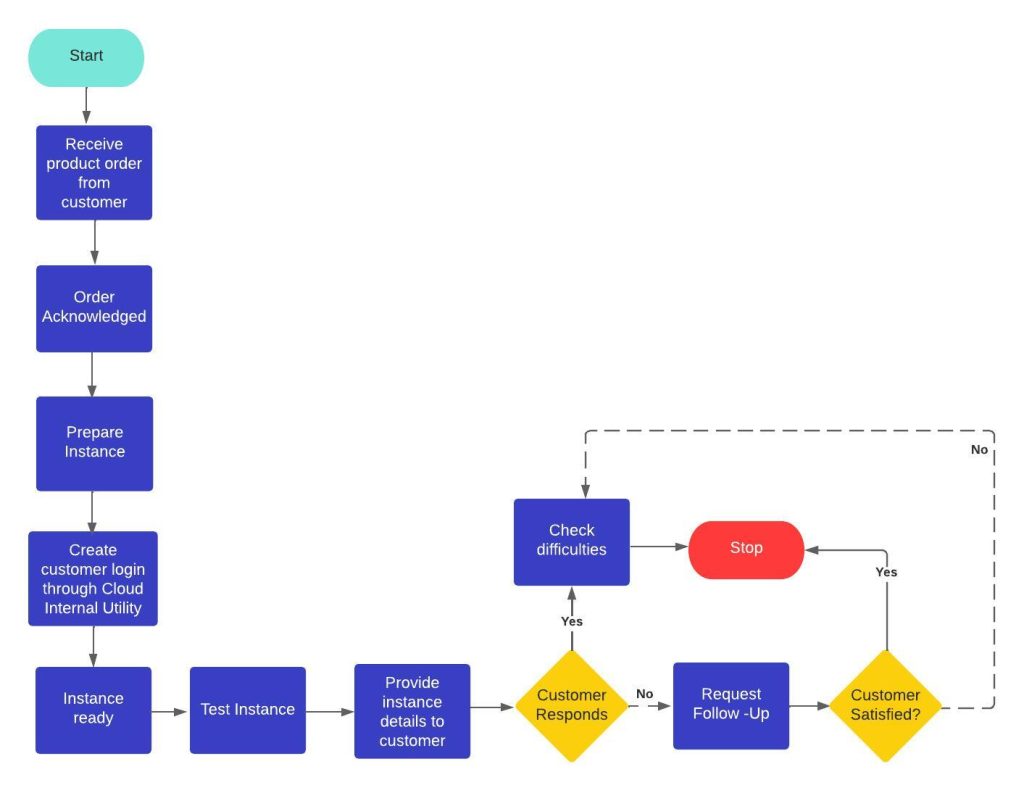
Cloud-Hosted Solution Flow Diagram
4.3 Technology Stack (FMEA Executive Only)
- Language: C#
- Framework: .NET 6/7+ (Windows Forms or WPF client)
- Databases: Microsoft SQL Server (primary); Microsoft Access (optional/small deployments)
- Reporting: SSRS/Local RDLC reports; export to Excel/PDF
- Version Control (Artifacts & Config): Git (GitHub)
4.4 Hardware & Network
- Developer/Engineer Machines: i5/i7 or Ryzen 5/7, 8–16 GB RAM, 512 GB+ SSD, Windows 10/11 Pro.
- Servers: Cloud-hosted on AWS (for hosted option) and/or in-house backup servers.
- Network: Firewalled, role-based access; VPN/IP allow list for cloud.
5. Functional Requirements
5.1 FMEA Authoring & Libraries
- FR-1: Create DFMEA and PFMEA projects with metadata (site, product, line, part no., revision, owner, dates).
- FR-2: Template-driven structure aligned to AIAG handbook (Function → Failure Mode → Effects → Severity; Causes → Occurrence; Controls → Detection).
- FR-3: Organization libraries for Functions, Failure Modes, Causes, Effects, Controls, Detection Methods, and ratings scales; configurable picklists and numbering.
- FR-4: Inline calculations of RPN and Action Priority (AP) based on configured tables.
- FR-5: Bulk edit, import from Excel/CSV, and copy-from-template; change tracking at row/cell level.
5.2 Workflow
- FR-6: States: Draft → In Review → Baselined; configurable reviewers/approvers.
- FR-7: E-signature with name, role, timestamp, and reason; immutable baseline snapshot.
- FR-8: Audit trail for create/update/delete with before–after values.
5.3 Actions & Mitigations
- FR-9: Create corrective/preventive actions with owner, due date, status, and evidence links.
- FR-10: Re-score S/O/D after action closure; maintain history of pre/post scores.
- FR-11: Action Center view with filters (overdue, due this week, by owner/site).
5.4 Risk & Reporting
- FR-12: Dashboards for top risks by Severity, RPN, and AP; heatmaps.
- FR-13: Standard reports: FMEA sheet, Action summary, Overdue actions, Change log, Baseline comparison.
- FR-14: Exports to Excel and PDF; configurable company letterhead on reports.
5.5 Data & Configuration
- FR-15: Multisite support with site-level numbering, calendars, and rating scales.
- FR-16: User/role management: Admin, Author, Reviewer, Approver, Viewer, Auditor.
- FR-17: Localization-ready (UI strings externalized); date/number formats per site.
- FR-18: Attachments (drawings, images, SPC charts) stored in DB or secure file store with references.
Data Model (High-Level)
- Entities: Project, FMEA (DFMEA/PFMEA), Function, Failure Mode, Effect, Cause, Control (Prevention/Detection), Rating (S/O/D), Action, User, Role, Attachment, Baseline, AuditLog, Template, LibraryItem.
- Keys: Natural keys for part/operation; surrogate keys (GUID/INT) for rows; version fields for baselining.
7. UI/UX Requirements
- Easy to use editor for FMEA rows with inline dropdowns for adding functions, failures etc.
- Ribbon/toolbar for common actions.
- Color cues for high Severity/AP; badges for overdue actions.
8. Validation Rules (Illustrative)
- Severity/Occurrence/Detection must be integers within configured scales (e.g., 1–10 or AIAG–VDA tables).
- At least one Prevention or Detection control per Cause before approval.
- No approval allowed if any action is Open past due date unless waiver recorded.
- Baseline requires all mandatory metadata filled and at least one reviewer approval.
9. Import/Export & Interoperability
- Import from legacy Excel/CSV templates; map columns to entities; preview before commit.
- Export full FMEA, Action List, and Change Log to Excel/PDF with letterhead.
- Optional Access DB sync for small sites; scheduled job to consolidate into SQL Server.
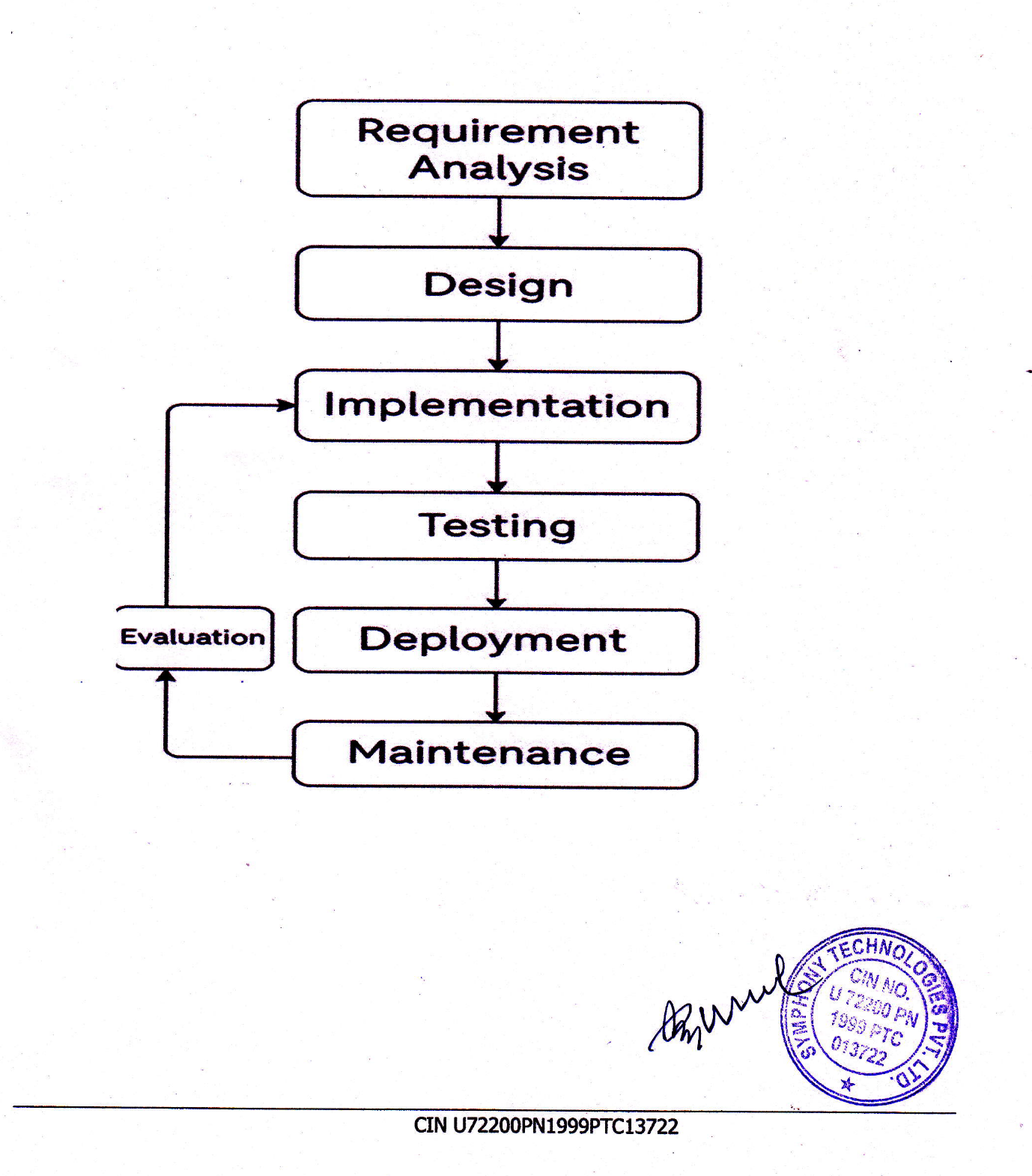
10. SDLC & Delivery
- Methodology: Agile (Scrum-based). Weekly sprint planning & retrospectives.
- Work Items: Managed in SharePoint (Loop components) or equivalent.
- Version Control: Git (GitHub/GitLab). Feature branching and PR reviews.
13. Environments & Installation
-
- Client: Windows 10/11 Pro; .NET Desktop Runtime.
- Database: If network Lisc SQL Server 2019/2022 (cloud or on-prem). For Access, provide .accdb files with schema migration scripts.
li>
Configuration: App settings for DB connection
14. Compliance Mapping (AIAG–VDA)
- Structure matches AIAG–VDA forms; AP logic per handbook table; terminology configurable.
- Evidence: Baseline snapshot, audit trail, signatures, and change log reports.
15. Constraints & Assumptions
- Users have Windows domain accounts (if AD used) and required permissions.
- Network connectivity to SQL Server (or Access file share) is available.
- Company IT provides backups, antivirus, and patching per policy.
16. Traceability Matrix (Skeleton)
17. Appendices
- Appendix A: Machine & Tech Stack Response (FMEA Executive)
- Machines Used: High-performance development laptops and desktops (Intel i5/i7 or AMD Ryzen 5/7; 8GB+ RAM; 512GB/1TB SSD; Windows 10/11 Pro).
- Frameworks Utilized: .NET (Windows Forms or WPF) for client.
- Programming Languages: C#, SQL.
- SDLC: Agile (Scrum-based); weekly sprint planning & retrospectives; version control using Git (GitHub/GitLab); project management via SharePoint Loop components.
- Backend Database: Microsoft SQL Server (primary), Microsoft Access (optional/small deployments).
- Hardware (Servers/Networking): Development & testing servers (cloud-hosted on AWS); in-house backup servers; Git repositories; firewalled, access-controlled network infrastructure.
18. Sample Software Screens
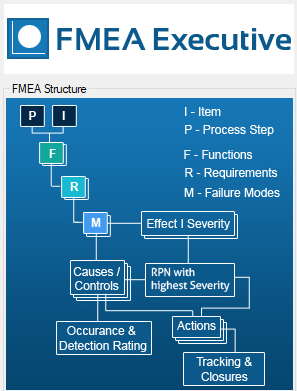
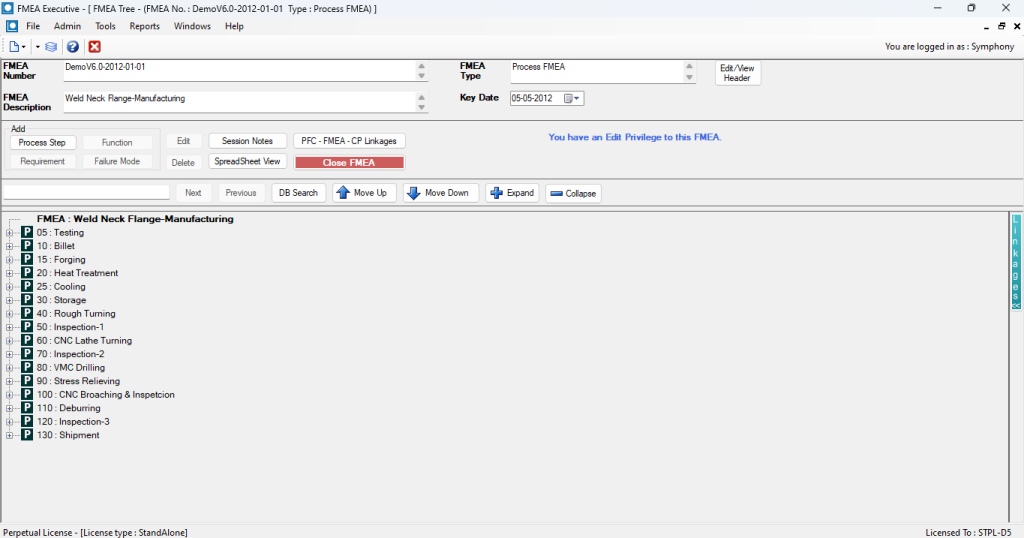
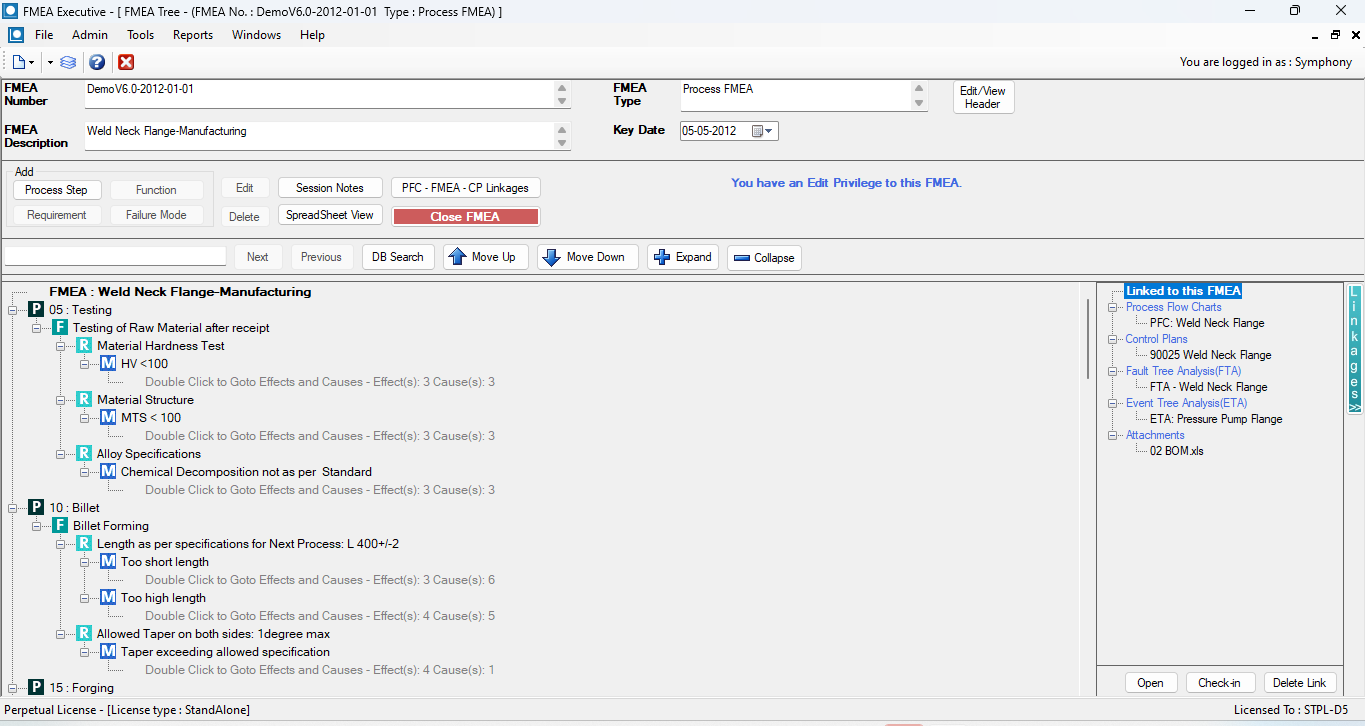
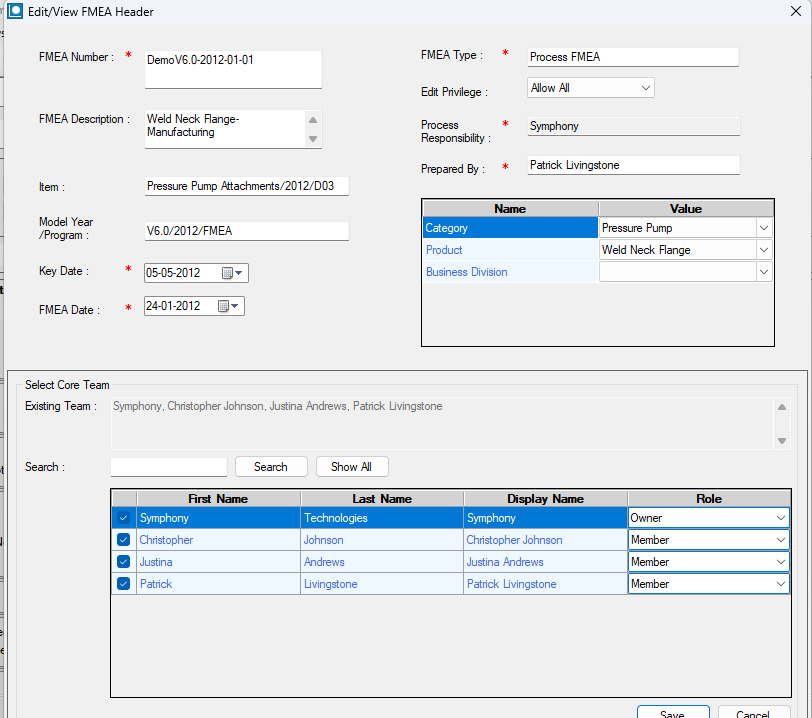
FMEA Structure
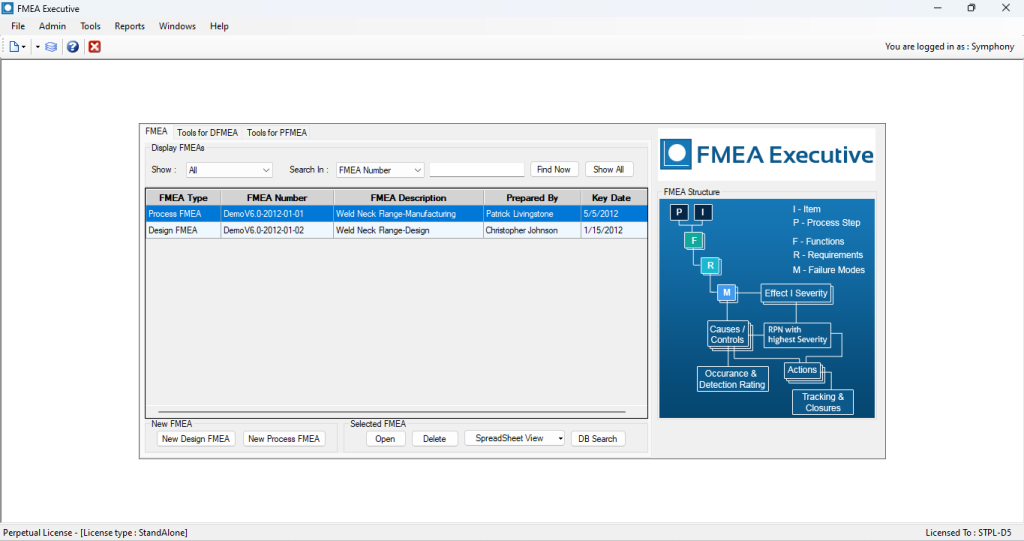
FMEA created by user are listed as follows
Tree Structure For FMEA
BLOWJOB PORN CHILD


